Gallery / Interaction
interaction
Inspect and pin data
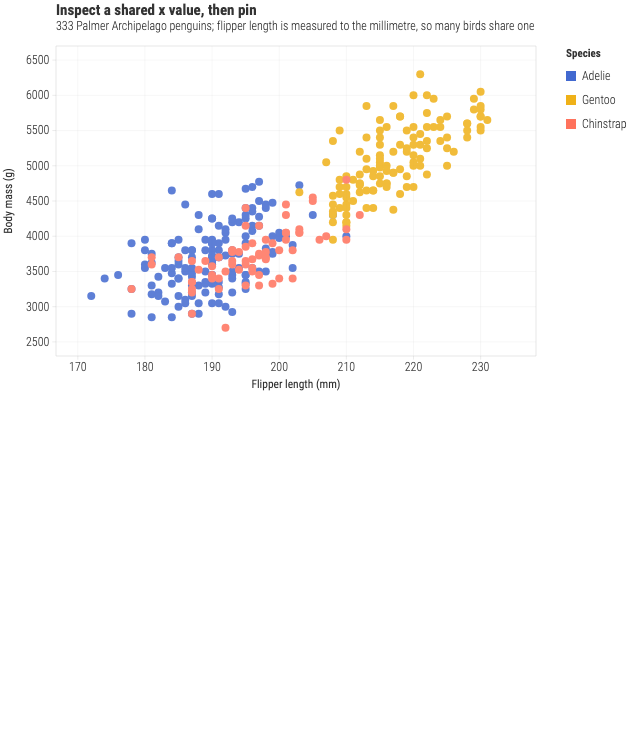
Palmer penguin measurements with a crosshair that reads every series at one x, and a pin so the reading stays while you look elsewhere.
Interaction
- Pointer
- Move across a shared x value to inspect its group, then click to pin it.
- Keyboard
- Tab to the chart, use the Arrow keys to inspect x groups, press Enter to pin, and press Escape to dismiss.
- Touch
- Tap an x group to pin its values; tap outside the chart to dismiss the inspection.
Source
Svelte, builder, JSON
<script lang="ts">
  import { GeomPoint, GGPlot, Labs, ThemeLight } from "@ggsvelte/svelte";

  import { penguins } from "./data.js";

  let inspectionStatus = $state("Move across the plot or use the arrow keys.");
</script>

<!-- Inspection is opt-in. The default HTML tooltip, crosshair, keyboard
     traversal, and pinning all consume the same semantic event. -->
<GGPlot
  data={penguins}
  aes={{ x: "flipper", y: "mass", color: "species" }}
  key="id"
  inspect={{ mode: "x", pin: true, maxDistance: 24 }}
  oninspect={(event) => {
    inspectionStatus =
      event.phase === "clear"
        ? `Inspection cleared by ${event.source}.`
        : `${event.state === "pinned" ? "Pinned" : "Inspecting"} ${String(event.focus.row?.species ?? "datum")} · ${String(event.members.length)} member${event.members.length === 1 ? "" : "s"} · ${event.source}`;
  }}
  width="container"
  height={400}
>
  <ThemeLight />
  <Labs
    title="Inspect a shared x value, then pin"
    subtitle="333 Palmer Archipelago penguins; flipper length is measured to the millimetre, so many birds share one"
    x="Flipper length (mm)"
    y="Body mass (g)"
    color="Species"
  />
  <GeomPoint size={4} alpha={0.85} />
</GGPlot>

<!-- Visual callback evidence only. GGPlot owns the single concise live region. -->
<p class="event-status gg-demo-chrome">{inspectionStatus}</p>

<style>
  .event-status {
    max-width: 640px;
    margin: 0.6rem 0 0;
    color: var(--muted, #59636e);
    font: 0.82rem/1.4 var(--gg-font-family, system-ui, sans-serif);
  }
</style>
Meta
Details
- Family
- Interaction
- Source
interaction/tooltip- Rendering
- SVG
- Techniques
Related