Gallery / Interaction
interaction
Focus a legend group without changing the data
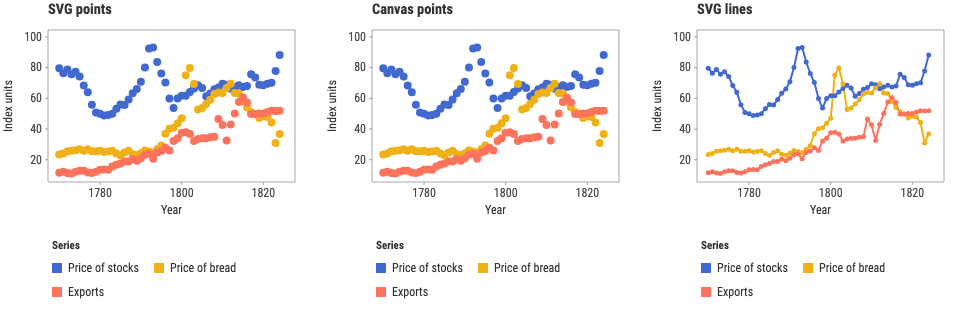
Three of Playfair's commodity series. Focusing a group dims the others rather than dropping them, so the scales never move under you.
Interaction
- Pointer
- Hover a discrete legend entry to preview one plot, then click to pin the group across all three views.
- Keyboard
- Tab to a legend entry, use arrow keys or Home and End to move, press Enter or Space to pin, and Escape to clear.
- Touch
- Tap a legend entry to pin it across the SVG and canvas views; tap the active entry or Clear legend focus to reset.
Source
Svelte, builder, JSON
<script lang="ts">
  import {
    createPlotInteraction,
    GeomLine,
    GeomPoint,
    GGPlot,
    Labs,
    ScaleXContinuous,
    ThemeFew,
  } from "@ggsvelte/svelte";

  import { rows } from "./data.js";

  const scope = { keys: "legend-focus-rows" } as const;
  const mapping = { x: "year", y: "value", color: "series" } as const;
  const interaction = createPlotInteraction<string>();
  const emphasized = $derived(interaction.emphasized(scope));
  let status = $state(
    "Hover a legend entry to preview. Click, tap, Enter, or Space to pin it.",
  );

  function describe(event: {
    phase: "change" | "clear";
    state?: "transient" | "committed";
    label?: string;
    keys?: readonly string[];
    source: string;
  }): void {
    status =
      event.phase === "clear"
        ? `Legend focus cleared by ${event.source}.`
        : `${event.label} ${event.state === "committed" ? "pinned across three views" : "previewed here"}; ${String(event.keys?.length ?? 0)} rows.`;
  }
</script>

<div class="legend-focus-demo">
  <p class="status gg-demo-chrome" role="status" aria-live="polite">{status}</p>
  <div class="plots">
    <GGPlot
      data={rows}
      aes={mapping}
      key="id"
      legendFocus
      {interaction}
      interactionScope={scope}
      width="container"
      height={310}
      onlegendfocus={describe}
    >
      <ThemeFew />
      <ScaleXContinuous labels="d" />
      <Labs title="SVG points" x="Year" y="Index units" color="Series" />
      <GeomPoint size={4} />
    </GGPlot>
    <GGPlot
      data={rows}
      aes={mapping}
      key="id"
      legendFocus
      {interaction}
      interactionScope={scope}
      width="container"
      height={310}
      onlegendfocus={describe}
    >
      <ThemeFew />
      <ScaleXContinuous labels="d" />
      <Labs title="Canvas points" x="Year" y="Index units" color="Series" />
      <GeomPoint size={4} render="canvas" />
    </GGPlot>
    <GGPlot
      data={rows}
      aes={mapping}
      key="id"
      legendFocus
      {interaction}
      interactionScope={scope}
      width="container"
      height={310}
      onlegendfocus={describe}
    >
      <ThemeFew />
      <ScaleXContinuous labels="d" />
      <Labs title="SVG lines" x="Year" y="Index units" color="Series" />
      <GeomLine linewidth={2} />
      <GeomPoint />
    </GGPlot>
  </div>
  <div class="summary gg-demo-chrome">
    <strong>{emphasized.length} rows focused</strong>
    <button
      type="button"
      disabled={emphasized.length === 0}
      onclick={() =>
        interaction.clearEmphasis({ scope, source: "programmatic" })}
      >Clear from ordinary Svelte UI</button
    >
  </div>
</div>

<style>
  .legend-focus-demo {
    display: grid;
    gap: 1rem;
  }

  .plots {
    display: grid;
    grid-template-columns: repeat(3, minmax(0, 1fr));
    gap: 0.8rem;
  }

  .status,
  .summary {
    margin: 0;
    color: var(--fg, #17202a);
    font: 0.86rem/1.4 var(--gg-font-family, system-ui, sans-serif);
  }

  .summary {
    display: flex;
    align-items: center;
    justify-content: space-between;
    gap: 1rem;
    padding: 0.75rem 0.9rem;
    border: 1px solid color-mix(in srgb, currentColor 16%, transparent);
    border-radius: 0.5rem;
  }

  button {
    min-height: 2.25rem;
    border: 1px solid color-mix(in srgb, currentColor 28%, transparent);
    border-radius: 0.4rem;
    padding: 0.4rem 0.7rem;
    background: var(--surface, white);
    color: inherit;
    font: inherit;
  }

  @media (max-width: 900px) {
    .plots {
      grid-template-columns: 1fr;
    }
  }
</style>
Meta
Details
- Family
- Interaction
- Source
interaction/legend-focus- Rendering
- Canvas marks with SVG chrome
- Techniques
Related