Gallery / Interaction
interaction
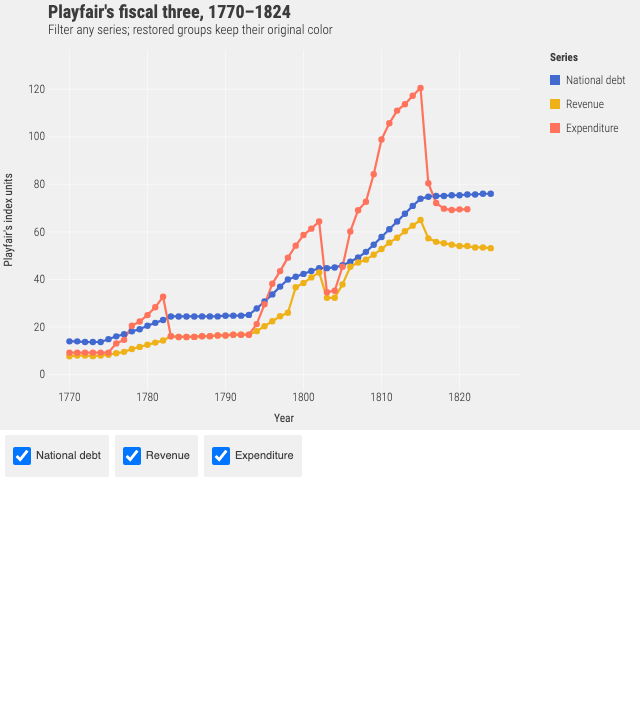
Playfair's fiscal three, 1770 to 1824
Debt, revenue and expenditure. Filter any series from the legend and the ones that come back keep the colour they had.
Interaction
- Pointer
- Clear Show Rail, then restore it. The line disappears and returns with the same blue color.
- Keyboard
- Tab through the Show group checkboxes, press Space to toggle groups, and use Reset legend filters to restore every group.
- Touch
- Tap any Show group checkbox to filter the plotted data; tap Reset to restore the complete dataset.
Source
Svelte, builder, JSON
<script lang="ts">
  import {
    GeomLine,
    GeomPoint,
    GGPlot,
    Labs,
    ScaleXContinuous,
    ThemeFivethirtyeight,
  } from "@ggsvelte/svelte";

  import { britishFinances } from "./data.js";

  let status = $state(
    "All three series are included. Toggle a checkbox to filter the grammar pipeline.",
  );
</script>

<div class="legend-filter-demo">
  <p class="status gg-demo-chrome" role="status" aria-live="polite">{status}</p>
  <GGPlot
    data={britishFinances}
    aes={{ x: "year", y: "value", color: "series" }}
    key="id"
    legendFilter
    width="container"
    height={430}
    onlegendfilter={(event) => {
      status =
        event.phase === "clear" || event.clause === null
          ? "All series restored. Color identity did not change."
          : `${String(event.clause.values.length)} ${event.clause.values.length === 1 ? "series is" : "series are"} hidden; the legend keeps every series available.`;
    }}
  >
    <ThemeFivethirtyeight />
    <ScaleXContinuous labels="d" />
    <Labs
      title="Playfair's fiscal three, 1770–1824"
      subtitle="Filter any series; restored groups keep their original color"
      x="Year"
      y="Playfair's index units"
      color="Series"
    />
    <GeomLine linewidth={2.2} />
    <GeomPoint size={3.2} />
  </GGPlot>
  <p class="note gg-demo-chrome">
    <strong>Why this is filtering:</strong> statistics, facets, and domains see
    only the visible rows. For visual comparison without changing data, use
    <code>legendFocus</code> instead.
  </p>
</div>

<style>
  .legend-filter-demo {
    display: grid;
    gap: 0.8rem;
  }

  .status,
  .note {
    margin: 0;
    color: inherit;
    font: 0.86rem/1.45 var(--gg-font-family, system-ui, sans-serif);
  }

  .status {
    border-inline-start: 3px solid var(--accent, #2c7fb8);
    padding: 0.55rem 0.75rem;
    background: color-mix(in srgb, var(--accent, #2c7fb8) 7%, transparent);
  }

  .note {
    color: var(--muted, #59636e);
  }

  code {
    color: inherit;
  }
</style>
Meta
Details
- Family
- Interaction
- Source
interaction/legend-filter- Rendering
- SVG
- Techniques
Related