Gallery / Interaction
interaction
Link plots, controls, and a table
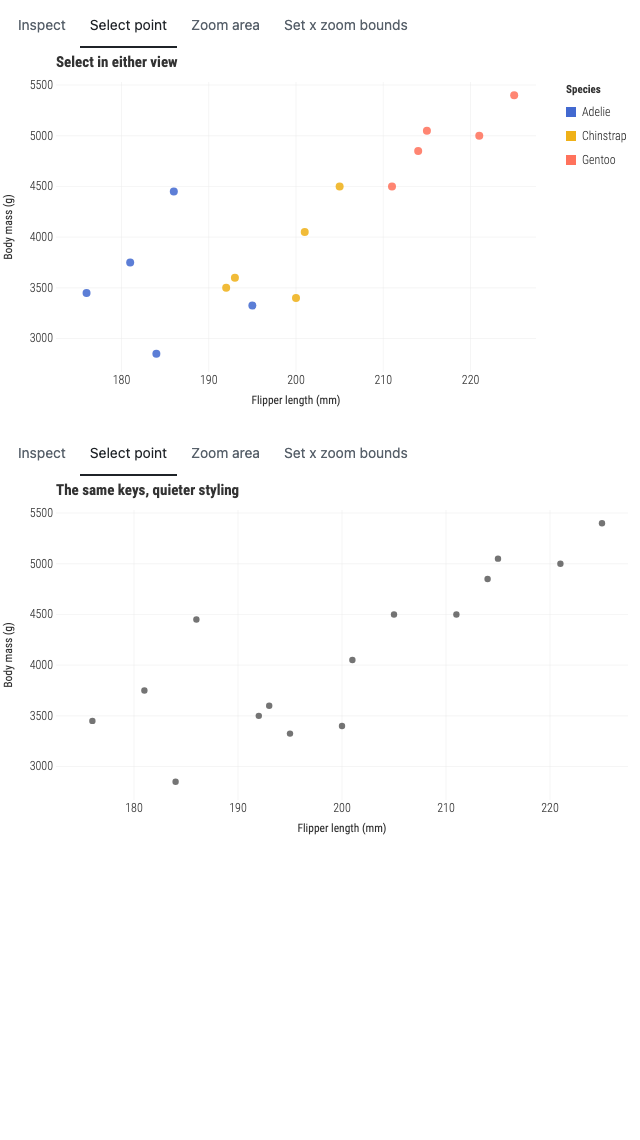
Five Palmer penguins per species, so every row a selection touches is visible in the table beside the chart.
Interaction
- Pointer
- Select points in either plot, hover or focus table controls to emphasize rows, and use the external controls to update every linked view.
- Keyboard
- Tab to a plot and press Enter or Space to select its focused point. Continue into the table to toggle or emphasize rows with ordinary buttons.
- Touch
- Tap points in either plot or use the large external controls; linked selection updates both plots and the table.
Source
Svelte, builder, JSON
<script lang="ts">
  import {
    createPlotInteraction,
    GeomPoint,
    GGPlot,
    Labs,
    ThemeMinimal,
  } from "@ggsvelte/svelte";

  import { penguins, type PenguinRow } from "./data.js";

  const scope = { keys: "penguin-id", x: "flipper-mm", y: "mass-g" } as const;

  // The emphasis control targets the second Adelie row. Derive it rather than
  // naming a key: an id that no longer exists would leave the button reading as
  // pressed while emphasizing nothing at all.
  const emphasisTarget = penguins.filter((row) => row.species === "Adelie")[1];
  if (emphasisTarget === undefined) {
    throw new Error(
      "linked-views needs at least two Adelie rows for the emphasis control",
    );
  }
  let rows = $state<readonly PenguinRow[]>(penguins);
  let showingAllRows = $state(true);
  let status = $state("Select a point in either plot, or use a control below.");

  const interaction = createPlotInteraction<string>({
    onchange: (transition) => {
      status = `${transition.kind} changed by ${transition.source}; revision ${String(transition.revision)}.`;
    },
  });
  const selected = $derived(interaction.selected(scope));
  const emphasized = $derived(interaction.emphasized(scope));

  function selectSpecies(species: PenguinRow["species"]): void {
    interaction.setSelection(
      rows.filter((row) => row.species === species).map((row) => row.id),
      { scope, source: "programmatic" },
    );
  }

  function emphasize(id: string): void {
    interaction.setEmphasis([id], { scope, source: "programmatic" });
  }

  function clearEmphasis(): void {
    interaction.clearEmphasis({ scope, source: "programmatic" });
  }

  function replaceRows(): void {
    showingAllRows = !showingAllRows;
    rows = showingAllRows
      ? penguins
      : penguins.filter((row) => row.species !== "Chinstrap");
    interaction.reconcileKeys(
      rows.map((row) => row.id),
      { scope, source: "programmatic" },
    );
    status = showingAllRows
      ? "Restored every row; stable selections remain linked."
      : "Removed Chinstrap rows and explicitly reconciled shared keys.";
  }

  function clearAll(): void {
    interaction.clearSelection({ scope, source: "programmatic" });
    interaction.clearEmphasis({ scope, source: "programmatic" });
    interaction.resetZoom({ scope, source: "programmatic" });
    status = "Selection, emphasis, and zoom cleared.";
  }
</script>

<div class="linked-demo">
  <div class="plots">
    <GGPlot
      data={rows}
      aes={{ x: "flipper", y: "mass", color: "species" }}
      select={{ type: "point", multiple: true }}
      zoom={{ mode: "x" }}
      {interaction}
      interactionScope={scope}
      width="container"
      height={360}
      ariaLabel="Penguins by flipper length and body mass, colored by species"
    >
      <ThemeMinimal />
      <Labs
        title="Select in either view"
        x="Flipper length (mm)"
        y="Body mass (g)"
        color="Species"
      />
      <GeomPoint size={4} alpha={0.86} />
    </GGPlot>

    <GGPlot
      data={rows}
      aes={{ x: "flipper", y: "mass" }}
      select={{ type: "point", multiple: true }}
      zoom={{ mode: "x" }}
      {interaction}
      interactionScope={scope}
      width="container"
      height={360}
      ariaLabel="Penguins by flipper length and body mass in a quieter style"
    >
      <ThemeMinimal />
      <Labs
        title="The same keys, quieter styling"
        x="Flipper length (mm)"
        y="Body mass (g)"
      />
      <GeomPoint size={3.2} color="#287271" alpha={0.68} />
    </GGPlot>
  </div>

  <section
    class="controls gg-demo-chrome"
    aria-labelledby="linked-controls-heading"
  >
    <div>
      <p class="eyebrow" id="linked-controls-heading">External controls</p>
      <p class="status">{status}</p>
    </div>
    <div class="button-row">
      <button type="button" onclick={() => selectSpecies("Gentoo")}
        >Select Gentoo</button
      >
      <button
        type="button"
        aria-pressed={emphasized.includes(emphasisTarget.id)}
        onclick={() => emphasize(emphasisTarget.id)}>Emphasize Adelie 2</button
      >
      <button type="button" onclick={replaceRows}>
        {showingAllRows ? "Remove Chinstrap rows" : "Restore all rows"}
      </button>
      <button type="button" onclick={clearAll}>Clear all</button>
    </div>
  </section>

  <div class="table-wrap gg-demo-chrome">
    <table>
      <caption>
        Linked semantic rows — {selected.length} selected, {emphasized.length} emphasized
      </caption>
      <thead>
        <tr
          ><th scope="col">Penguin</th><th scope="col">Species</th><th
            scope="col">Flipper</th
          ><th scope="col">Mass</th><th scope="col">Selection</th></tr
        >
      </thead>
      <tbody>
        {#each rows as row (row.id)}
          <tr
            aria-selected={selected.includes(row.id)}
            class:emphasized={emphasized.includes(row.id)}
          >
            <th scope="row">{row.id}</th>
            <td>{row.species}</td>
            <td>{row.flipper} mm</td>
            <td>{row.mass.toLocaleString()} g</td>
            <td>
              <button
                type="button"
                class="row-button"
                aria-pressed={selected.includes(row.id)}
                onmouseenter={() => emphasize(row.id)}
                onmouseleave={clearEmphasis}
                onfocus={() => emphasize(row.id)}
                onblur={clearEmphasis}
                onclick={() => interaction.toggleSelection(row.id, { scope })}
                >{selected.includes(row.id) ? "Selected" : "Select"}</button
              >
            </td>
          </tr>
        {/each}
      </tbody>
    </table>
  </div>
</div>

<style>
  .linked-demo {
    display: grid;
    gap: 1rem;
  }

  .plots {
    display: grid;
    grid-template-columns: repeat(2, minmax(0, 1fr));
    gap: 1rem;
  }

  .controls {
    display: flex;
    align-items: center;
    justify-content: space-between;
    gap: 1rem;
    padding: 1rem 1.1rem;
    border: 1px solid color-mix(in srgb, var(--fg, #17202a) 16%, transparent);
    border-radius: 0.7rem;
    background: color-mix(in srgb, var(--surface, white) 94%, #287271 6%);
  }

  .eyebrow,
  .status {
    margin: 0;
  }

  .eyebrow {
    color: var(--fg, #17202a);
    font: 650 0.78rem/1.2 var(--gg-font-family, system-ui, sans-serif);
    letter-spacing: 0.05em;
    text-transform: uppercase;
  }

  .status {
    margin-top: 0.25rem;
    color: var(--muted, #59636e);
    font: 0.84rem/1.35 var(--gg-font-family, system-ui, sans-serif);
  }

  .button-row {
    display: flex;
    flex-wrap: wrap;
    justify-content: flex-end;
    gap: 0.45rem;
  }

  button {
    min-height: 2.25rem;
    padding: 0.42rem 0.72rem;
    border: 1px solid color-mix(in srgb, var(--fg, #17202a) 26%, transparent);
    border-radius: 0.42rem;
    background: var(--surface, white);
    color: var(--fg, #17202a);
    font: 600 0.78rem/1.2 var(--gg-font-family, system-ui, sans-serif);
    cursor: pointer;
  }

  button:hover,
  button:focus-visible,
  button[aria-pressed="true"] {
    border-color: #287271;
    background: color-mix(in srgb, #287271 13%, var(--surface, white));
    outline: none;
  }

  button:focus-visible {
    box-shadow: 0 0 0 3px color-mix(in srgb, #287271 28%, transparent);
  }

  .table-wrap {
    overflow-x: auto;
  }

  table {
    width: 100%;
    border-collapse: collapse;
    color: var(--fg, #17202a);
    font: 0.82rem/1.35 var(--gg-font-family, system-ui, sans-serif);
  }

  caption {
    padding: 0 0 0.55rem;
    font-weight: 650;
    text-align: left;
  }

  th,
  td {
    padding: 0.5rem 0.65rem;
    border-bottom: 1px solid
      color-mix(in srgb, var(--fg, #17202a) 12%, transparent);
    text-align: left;
  }

  thead th {
    color: var(--muted, #59636e);
    font-size: 0.72rem;
    letter-spacing: 0.04em;
    text-transform: uppercase;
  }

  tbody tr[aria-selected="true"] {
    background: color-mix(in srgb, #287271 12%, transparent);
  }

  tbody tr.emphasized {
    box-shadow: inset 3px 0 #e09f3e;
  }

  .row-button {
    min-height: 2rem;
    min-width: 5rem;
  }

  @media (max-width: 860px) {
    .plots {
      grid-template-columns: 1fr;
    }

    .controls {
      align-items: stretch;
      flex-direction: column;
    }

    .button-row {
      justify-content: flex-start;
    }
  }
</style>
Meta
Details
- Family
- Interaction
- Source
interaction/linked-views- Rendering
- SVG
- Techniques
Related