Gallery / Interaction
interaction
Interval selection and zoom
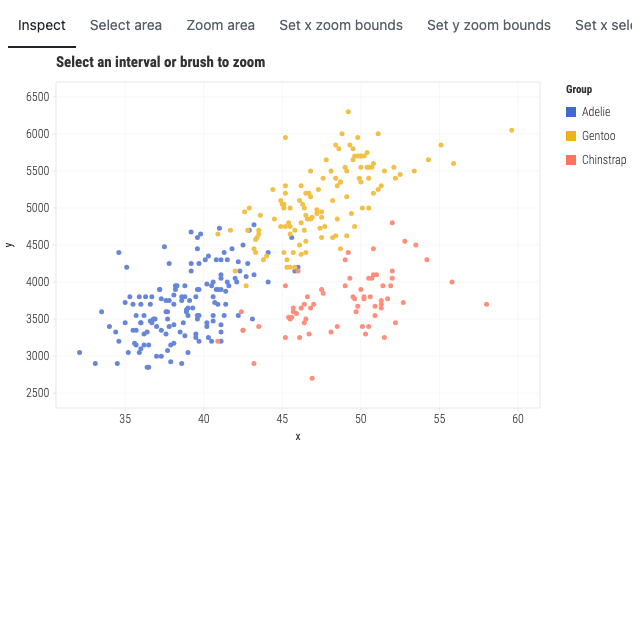
333 Palmer penguins: brush a rectangle to select, or zoom into the crowded middle where the species overlap.
Interaction
- Pointer
- Choose Select area or Zoom area, then drag across the points. Use Inspect for ordinary hovering.
- Keyboard
- Tab to the chart or tool rail. In a drawing tool, press Enter to set a corner, move with the Arrow keys (Shift moves farther), press Enter to finish, and Escape to cancel.
- Touch
- Choose a tool, then drag or tap two corners. Inspect mode leaves ordinary page scrolling available.
Source
Svelte, builder, JSON
<script lang="ts">
  import { GeomPoint, GGPlot, Labs, ThemeLight } from "@ggsvelte/svelte";

  import { field } from "./data.js";

  let selectionStatus = $state("Choose Select area and drag a rectangle.");
  let zoomStatus = $state("Choose Zoom area to rescale, then Reset zoom.");
</script>

<!-- Zoom area is deliberately armed from the tool rail; a finished drag inverts the rect
     through the trained scales into explicit continuous domains (an
     intentional respec). prevScales flow through the commit path, so the
     group colors NEVER shift while zooming. Double-click resets. -->
<GGPlot
  data={field}
  aes={{ x: "bill", y: "mass", color: "species" }}
  key="id"
  inspect={true}
  select={{ type: "interval", mode: "xy", persistent: true }}
  zoom={{ mode: "xy" }}
  onselect={(event) => {
    if (event.mode !== "point") {
      selectionStatus =
        event.phase === "clear"
          ? "Selection cleared."
          : `${event.phase}: ${String(event.keys.length)} keyed rows, ${String(event.lineageCount)} marks`;
    }
  }}
  onzoom={(event) => {
    zoomStatus =
      event.phase === "clear"
        ? "Zoom reset."
        : `Zoomed to x ${event.domains?.x?.map((value) => value.toFixed(2)).join("–") ?? "all"}, y ${event.domains?.y?.map((value) => value.toFixed(2)).join("–") ?? "all"}.`;
  }}
  width="container"
  height={400}
>
  <ThemeLight />
  <Labs title="Select an interval or brush to zoom" x="x" y="y" color="Group" />
  <GeomPoint size={2.5} alpha={0.8} />
</GGPlot>

<!-- Visual callback evidence only. GGPlot owns the single concise live region. -->
<div class="event-status gg-demo-chrome">
  <p><strong>Selection:</strong> {selectionStatus}</p>
  <p><strong>Zoom:</strong> {zoomStatus}</p>
</div>

<style>
  .event-status {
    max-width: 640px;
    margin-top: 0.6rem;
    color: var(--muted, #59636e);
    font: 0.82rem/1.4 var(--gg-font-family, system-ui, sans-serif);
  }

  .event-status p {
    margin: 0.15rem 0;
  }
</style>
Meta
Details
- Family
- Interaction
- Source
interaction/brush-zoom- Rendering
- SVG
- Techniques
Related